


Tired of building an email list and not having the results you want? Perhaps, you have decided to remove building list from your priorities because you are not satisfied with the results?
Chances are you are held back by traditional methods of building list which can guarantee no lead in the 21st-century marketing strategy for a successful business.
To be successful in your leads generation journey, you have to be ruthless and aggressive but bear in mind that you have to be very strategic otherwise, it would be a recipe for another unsuccessful attempt.
Visitors have developed a dissatisfaction for sites that force optin-forms; this creates an unhealthy user experience and ultimately reduces the value of online business still using such approach.
User experience is the most important thing you must think about it while hoping to grow your list of email subscribers. The challenge, however, has been the lack of effective tools to aggressively gather email list without necessarily downgrading user experience and devaluing your online business.
Solving that puzzle requires using the right tools to help you achieve smashing results. Here is where MailOptin comes to help you out; it is a feature-rich email list building WordPress plugin that has been able to turn marketers fright into key strengths.
So where does MailOptin fits into our current generation of email list building strategy? We will take a look at some of the main features of the plugin. Let’s get started.
Why Use MailOptin Plugin?
The first question that comes to mind is the why question, which helps to guide people from failing, especially as it relates to lead building.
MailOptin is built with beautiful optin forms for growing your subscriber’s base, the more emails you have on your list, the more bragging rights you have as an internet marketer. No doubt, a robust list is of complete value, with the list, you can have a dedicated following with your target audience, push useful content to them or spread your products to them.
MailOptin makes these things become a reality. You don’t need to have prior knowledge of coding; using the plugin is very simple, it has a lot of customization options that will attempt to create whatever ideas you have in mind.
MailOptin Features: What Does The Plugin have To Offer?
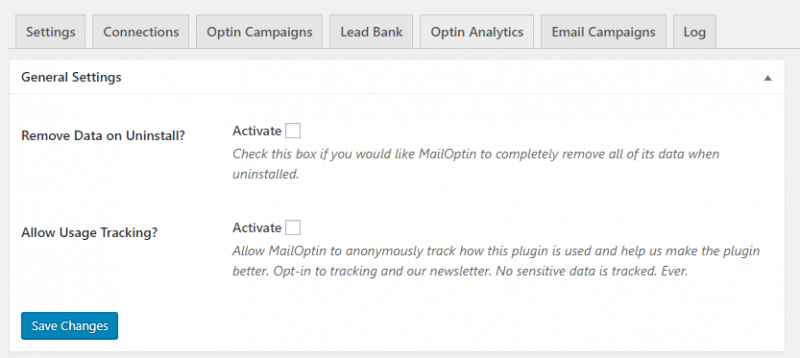
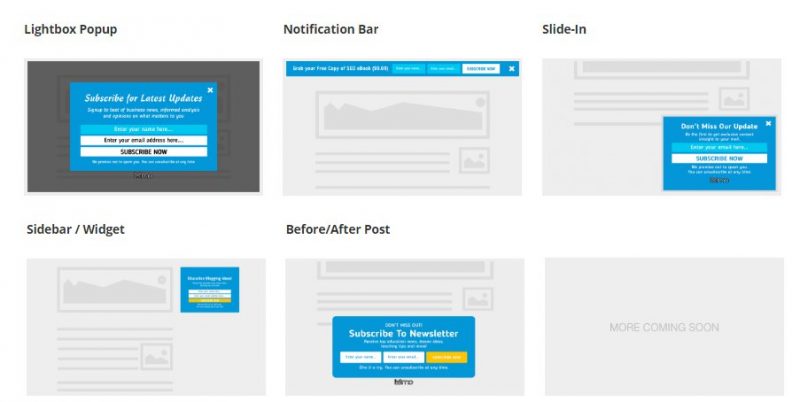
The plugin doesn’t disappoint, it delivers in most forms. However, users need to obtain a premium license to have access to all of its features. For example, premium users can choose between five types of optin forms, this feature is available to all premium licenses – something you can’t get elsewhere.
Users will have access to lightbox optin forms, in-post forms, sidebar forms, slide-in forms as well as notification-bar optins. I must add here again, that these forms are fully customizable with a wide range of display rules that change the way users interact with your optins forms. Basically, you can use these display rules to increase conversion rate without losing sweat.
More On Customization
There are a lot of high-quality multiple template pre-built in the plugin, customization takes place via the design options. All you need to do is create an Optin Campaign, then access it to view all its customization options, including the ability to change colors, remove elements, edit text, borders and effects. Almost every aspect of the form can be tweaked to suit your sense of design.
Display Rules
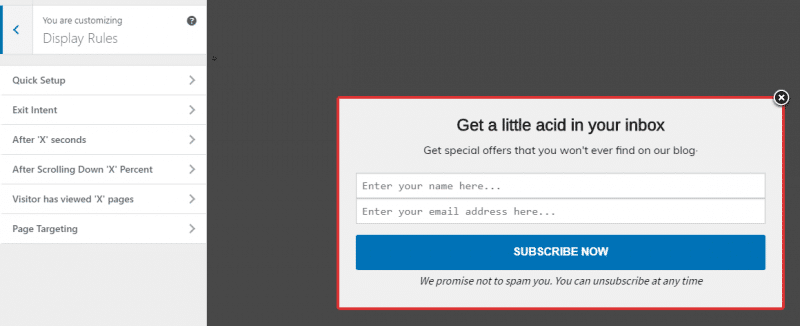
All forms come with different kind of display rules. There is an option to delay optin forms from showing unless a visitor has read up to a certain place. Users can force optin forms to show only after a specific number of pages have been visited by readers. Apart from these, you can also display optin forms on specific pages, as well prevent it from showing any number of pages you so desire. This is called Page-Level Targeting on MailOptin plugin, it is a feature that really brings out the dynamism in email list building.
Exit Intent
Earlier, it was said that the best way to radically increase subscriber count is by using the aggressive strategy of displaying pop-ups to users. More often than not, this was the only way, the right way but the strategy started failing, because of low conversion.
Because this greatly destroys user experience, visitors either blacklist sites with such aggressive list building strategy or exit the site immediately. Online business value fell in a downward spool while money was being lost every time a lead that ought to convert suddenly leaves your site.
Here is where MailOptin has advantage over the competition; the plugin will still allow you carry out aggressive email list building in disguise, without hampering user experience. With its built-in Exit Intent technology, the plugin can detect when a reader is about to leave your website, or exit your page. At that instance, it will display your optin form, which suddenly makes the reader take a pause. This is where the magic begins, at this point; the reader is stunned and curious to see what’s next after absorbing the content in your site. Most of the time, he is more willing to become your subscriber because he sees value in your website.
It really doesn’t add up displaying optin forms to visitors when they have no idea if your website will benefit them. With the Exit Intent feature, MailOptin will allow your visitors fall in love with your content first, then they can be willing to subscribe to your email list. How amazing!
Effective Split Testing And Optimisation
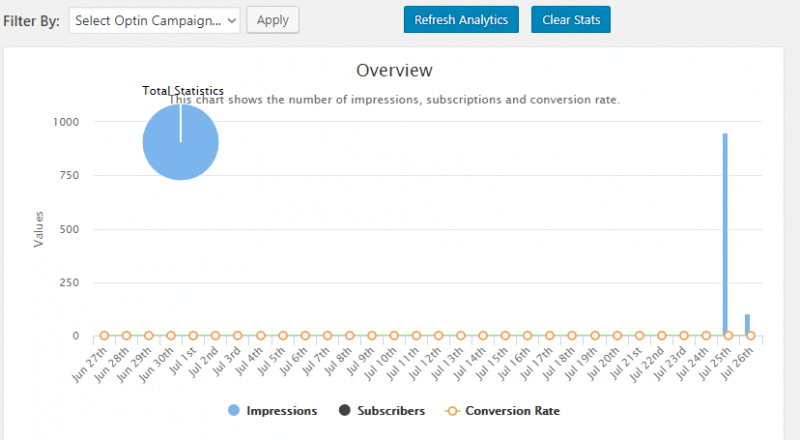
With so many theme design and customization options to choose from, you will have a hard time figuring out which form works best for you. Thankfully, the split testing tool on the plugin makes it very easy to compare multiple designs and options to discover the best performer.
This is called the ‘Optin Analytics’ on the plugin, it accurately reveals raw data to make your list building very efficient and effective. You will be able to track information like a number of impression per campaign, subscriber count and a whole bunch of other data. The data is nicely represented graphically for easy understanding and interpretation.
Integration With Multiple Email Marketing Services
MailOptin integrates will all the most popular email list management services, including MailChimp, Sendy, ConstantContact, CampaignMonitor and Aweber.
The integration is very straightforward, all you need to go paste the API of the email management service on MailOptin and a connection is established.
On a side note, you will easily spot the ‘Lead Bank’, this is where you can view the data of your subscribers. The name, email, user agent and the page from where the lead was generated is displayed. From this page, you will also have the option to export all your leads for whatever reason you so desire.
Creating An Optin Form
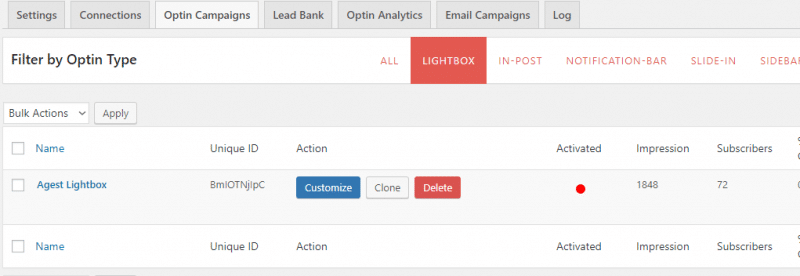
After installing MailOptin and setting up your connection with your email management service, you will want to start creating optin forms. Let’s walk through the process of creating a popup email optin form for the purpose of this review.
Click on ‘Optin Campaigns’ to find five optin forms available. Next, you will decide which optin you want to create; in this case, it’s the Light Box optin form we are going to create.
Thereafter, you will select a form template, and give it a name. Then you can proceed to the customization area where you can change the look and feel of the opting form using the design element tab.
You can edit all the text on the optin form using the Headline, Description and Note tab on the customization menu. On the Configuration tab, you can decide to show or hide some element from appearing on the popup, the Effects tab basically controls how the popup will appear to your visitors, it could bounce, flash, slide or fade. There are so many effects to choose from, making it is impossible to run out of ideas.
Assuming you have already inserted your email service API on MailOptin ‘Connections’ tab just as we discussed earlier, the next thing to do is to simply connect the LightBox optin with your email marketing service in the ‘Integration’ tab in the customization menu.
Finally, the ‘Display Rules’ contains a different set of rules you can select from to control the way your optin form is displayed to visitors. I have selected the Exit Intent display rule, the reason of this is because I want the optin forms to be displayed to visitors only when they are about to exit the site. I must say at this point, that apart from the Exit Intent display rule, there are other display options you can play around with, I find every other them pretty interesting, but it all boils down to your preference.
Setting Up Email Campaign
Setting up email campaign is very straightforward, just add a new email campaign, give it a title and select a campaign type. At the time of writing, “New Post Notification” trigger has been well implemented into the plugin.
Setting up this kind of campaign will automatically trigger a newsletter to your subscribers each time you publish a new post. The built in templates ensures sending newsletter is fast and all you have to do is sit back and track the performance of your forms using the analytics data on the plugin.
Pricing
MailOptin is available in two premium plans and a free lite plan. Of course, the free version is a watered down version of the full product.
To get the most out of MailOptin, you can get the standard plan for $99 or the Pro plan for $199. Check the official pricing to check out what you get in each of these plans.
Conclusion and Recommendation
When it comes to optin forms, MailOptin is a great deal. The intuitive user interface, multiple templates, split testing abilities, as well as the much talked about exit intent and page level targeting feature, makes the plugin the perfect tool for building a robust email list.
Every step comes with a clear description, so there is so much you can do in terms of customization without being confused. You can pretty much create an optin form that matches the look and feel of your website within few minutes.
Rather than install a separate plugin to determine optin statistics, MailOptin comes with a complete analytics for carrying out A/B testing.
Therefore, if you are looking for an optin plugin with endless design options that is both effective and efficient, your best recommendation is the MailOptin plugin.

You must be logged in to post a comment.