


2003 marked the beginning of one of the most successful CMS platforms — WordPress. American blogger Matt Mullenweg and British blogger Mike Little developed WordPress, which now has 62% of the market share (CMS percentage). WordPress was created to make it easier for non-technical users to create, manage, and publish content on the web.
Over a decade later, in 2016, WordPress came up with its first major version of Gutenberg, introduced as a “block-based” editor.
To revolutionize the publishing experience as much as Johannes Gutenberg did with the written word (through the printing press), “Gutenberg” is the codename for a whole new way of working with WordPress.
The project initially focused on creating a “rich-text” editing interface for WordPress and was divided into four stages — editing, customization, collaboration, and multilingual support. This offered a range of features and tools to developers.
Gutenberg later introduced full site editing (FSE) in 2021 (included in the first release of WordPress 5.9 in early 2022) following the launch of post-block editing in December 2018.
The Gutenberg Editor Phases
Phase 1: Block Editor
The WordPress block editor offers WYSIWYG writing experience. Instead of coding, users can add dynamic components such as galleries or buttons to their pages and posts with content blocks. In June 2020, WordPress.com retired its classic WordPress editor.
Phase 2: Full-site editing
The Gutenberg project is entering a new phase to provide full website editing capabilities through content blocks. The development of a block directory, WordPress themes designed to recognize blocks, and navigation blocks for creating menus are all part of this project. The second phase will make it easier for WordPress users to customize their websites without coding. The entire project was implemented in late 2021.
Phase 3: Multi-author collaboration
The Gutenberg project introduced new features in 2022, allowing multi-author collaboration on WordPress websites. This feature will offer Google Docs-type collaboration in WordPress, allowing multiple people to edit content simultaneously.
WordPress (in its roadmap) announced that the collaboration phase would be rolled out officially in 2023, allowing for multi-author, multi-publisher, multi-manager, multi-client, and multi-stakeholder collaboration. This marked the successful implementation of phase 3, where WordPress streamlines collaborative editing.
It provides features like commenting, tagging, and proposing modifications on all content types, including dynamic blocks. Therefore, teams working on content may use WordPress to collaborate on documents like Google Docs users can.
Multilingual Support
The last stage of the Gutenberg project in WordPress will integrate multilingual support into the WordPress platform and the Gutenberg editor as a core part of the system. This means that WordPress will provide official backing for website translations and multilingual websites, removing the need for users to employ translation plugins like WordPress Multilingual Plugin (WPML), etc.
Developers turning to Gutenberg
Developers are leveraging the new WordPress Gutenberg editor that brings a whole new set of tools, plugins, and blocks to the platform. It enables users to create, edit, and publish content with a simple, intuitive, and easy drag-and-drop interface. Choose from a range of blocks that help include text, images, videos, galleries, columns, audio, and more in the content.
Beginners can easily arrange and style these blocks with a few clicks, as the built-in features make it simple to customize the design of any page or post. Moreover, users can also add custom code and scripts to create highly customized pages and posts.
Many seasoned developers and beginners looking to create and publish content faster with less time and effort can turn to Gutenberg editor. It also eliminates the need to learn HTML or coding, making it a favorable option for rookies in WordPress.
Gutenberg also has various themes, plugins, and blocks that help simplify customizing web pages. And, since WordPress Gutenberg is also compatible with various popular WordPress plugins, more users are integrating and customizing their sites with minimal effort.
Also, collaboration is another factor that pulls developers to use Gutenberg. Multiple authors and editors may work on the same content, demanding collaborative editing in WordPress. Gutenberg has got this covered. It allows multiple team members to work on the same document where real-time changes are reflected. This is useful for the content team having multiple authors needing to collaborate on the same project.
Key Features
Gutenberg editor offers a comprehensive solution for those looking to make the most out of WordPress. There are a plethora of features it offers since replacing the TinyMCE editor. Let’s explore some of those.
Block Editor
Gutenberg is the block editor. Blocks are components in WordPress where you can add content. This block editor helps users create complex layouts with text, images, quotes, videos, etc. Also, it is possible to combine multiple blocks within the previously unavailable layout.
Refined visual editor
Gutenberg offers an improved visual editor, making it easier for users to see what their content looks like in real-time. This means no switching back and forth between the code view and the live preview. It also allows users to quickly make changes without manually editing HTML or CSS code.
Tailored styling
Gutenberg has powerful customization options like CSS styles, allowing users to tailor their content with custom styling. They can choose from fonts, change colors, backgrounds, and more.
Reusable blocks
Gutenberg editor has several useful features, like reusable blocks that help create blocks once and use them multiple times in posts and pages. This help saves time when creating complex layouts or content repeated multiple times across a site.
Drag & Drop UI
Developers embrace and leverage Gutenberg’s intuitive drag-and-drop interface. It is easy to arrange blocks on the page to quickly build a page that fits the content aptly. This feature also simplifies rearranging content without switching between different views or manually adjusting HTML or CSS code.
Formatting and styling
Gutenberg has plenty of built-in tools that format and stylize content. This includes a toolbar for making text bold or italicized, adding headings, and creating lists. It also offers multiple tools to create columns, buttons, galleries, etc. These tools make it easy to quickly format the content without maneuvering with HTML or CSS code.
Starting with the Gutenberg Editor
For those looking to use Gutenberg to write a new post in WordPress, navigate to
Gutenberg > New Post.
Click the new Gutenberg button that appears when you hover over the title of an existing page or post to edit it.

Once the editor opens, check for the content separated into “blocks.” You can add more blocks by clicking the plus (+) sign.
Creating content with the block editor is simple. Pick from a range of block types where each has its own set of options.
For instance, when you select an image block, you’ll be presented with a pop-up bar that enables altering the size and alignment of the picture, editing the source file, and adding a link.
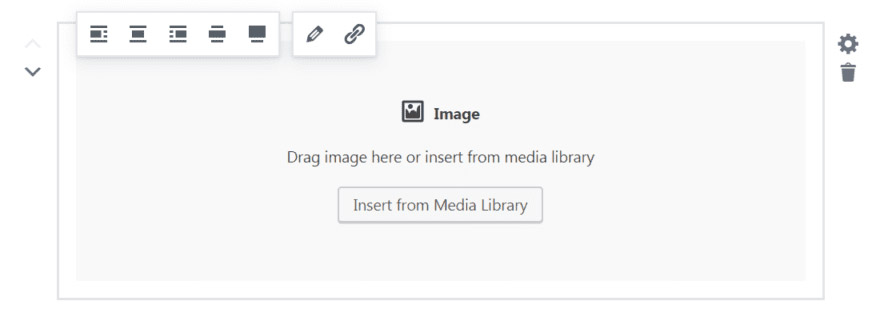
Moreover, you can change the order of blocks by using the up and down arrows beside each one. The sidebar will also display extra options based on the type of block chosen. For instance, you can switch on drop caps for a text block.
The text editor is still accessible through the menu bar at the upper left since Gutenberg continues to use blocks in this iteration of the editor.
The only catch is that it shows the content in a code (not in blocks)
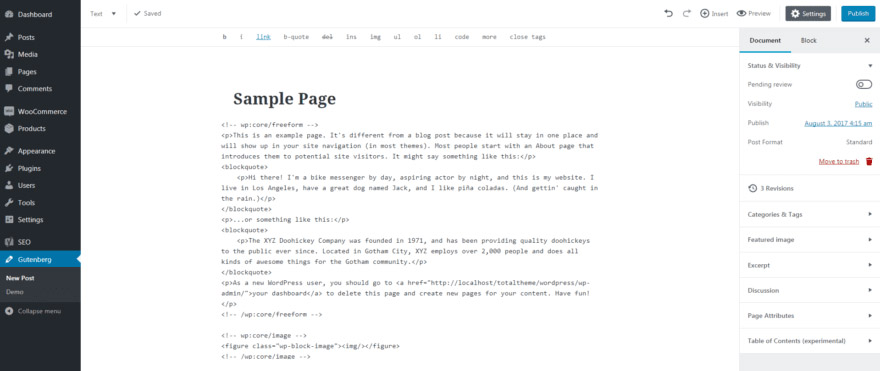
Discovering that your post or page options are all located in the sidebar under the Document tab will make it easier to manage your content. In this area, you can change the status, add categories and tags, select a featured image, and much more.
Advantages of Gutenberg editor
Think of Gutenbergas as more than just an editor — a content creation system that helps create stunning web pages seamlessly. The above features help unlock some crucial advantages publishers can relish while using Gutenberg.
Let’s find out more.
1. Intuitive Interface
One of the primary advantages of using the Gutenberg Editor is its intuitive user interface, making it easy to learn how to use the editor quickly. Those new to WordPress can leverage seamless UI designs with accessibility and drag-and-drop capabilities. Also, it has in-depth tutorials for beginners to get up to speed quickly.
2. Improved Content Creation
Gutenberg editor is a must-have for efficient content creation and publishing process. It helps developers break down content into individual blocks, enabling them to focus on each post or page section.
3. Built-In Shortcodes Support
Shortcodes are snippets of text (code) that you can copy and paste into your posts or pages to instantly add new features such as CTA buttons, contact forms, galleries, etc. Gutenberg editor has built-in shortcode support that simplifies adding complex features and functions to WordPress posts and pages. You can even create shortcodes with a few lines of code for a specific feature that isn’t included in the editor’s library of shortcodes.
4. Increased Multimedia Functionality
Adding images, videos, graphs, and audio to your posts using the Gutenberg editor is now easy. Drag and drop or paste images from your computer or online sources like YouTube and Spotify into your posts and pages. The editor also supports embeds from popular social media sites like Twitter, Facebook, Instagram, and YouTube, enabling you to add these elements to your content.
5. Enhanced SEO Benefits
You can optimize posts and pages for search engines with the Gutenberg Editor. It comes with built-in support for SEO meta tags such as page titles, description tags, and keyword tags to customize the SEO characteristics of each page without having to write any code. Moreover, it has a built-in feature to generate an XML sitemap which helps search engines better index your website. Moreover, Gutenberg is an ideal choice for those implementing schema markup that helps websites rank higher by enabling search engines to crawl your website.
6. Increased Security and Performance
Gutenberg Editor is a safe choice for website owners since it is built on a secure and reliable core infrastructure. Moreover, the editor is designed with performance in mind. Therefore, it won’t slow down your website’s loading times which is an issue with most WordPress editors.
7. Support for Responsive Layouts
Gutenberg Editor makes it easy to create content that looks good on all devices, from desktop computers to mobile phones — ensuring better compatibility across devices. The editor also has built-in support for responsive layouts to quickly adjust the styling of your posts or pages so they look as they are supposed to, regardless of the device. Gutenberg’s plugin for block library plugin provides templates to build a professional-looking layout for website content in a matter of minutes. Get the page and section layouts you prefer and use them on your current site with the help of the pattern importer.
Disadvantages of using Gutenberg
As with any technology, there are pros and cons, and it’s important to understand these before deciding whether it is an ideal fit for your website. Here, we’ll take a closer look at some of the main drawbacks of using Gutenberg to make an informed decision.
1. A Steep Learning Curve
An upfront disadvantage of using the Gutenberg editor (as compared to the Classic editor) is the steep learning curve that comes with it. The interface differs from the Classic Editor, which many WordPress users have become accustomed to over the years. It can take some time for users to get to grips with Gutenberg’s blocks-based system and perfect all the uses of its features.
2. Reactiveness Issues
Another downside of adopting the Gutenberg editor is responsiveness issues with certain blocks. This means that content may not display as it should when viewed on mobile devices or other displays of different sizes. This problem can take some time to troubleshoot and may need a developer’s help.
3. Limited Layout Options
There are some limited layout options with Gutenberg’s blocks. Therefore, newbies to WordPress may need developers’ help to fine-tune the desired design. Some plugins add extra features, but you’d need more to make your website stand apart, especially with complex designs.
4. Poor Customization Options
Gutenberg has only a few customization options compared to other editors. Therefore, you’d need to invest time to create a custom-looking website — an issue for those looking to grab greater control over their web design.
7. Incompatible with Older WordPress Versions
Gutenberg is compatible with WordPress version 5.0 and above. If you run an earlier version, you can’t take advantage of its features. This can be an issue for users who have yet to upgrade their WordPress version.
Conclusion
Overall, the Gutenberg editor can be a perfect solution for anyone wanting to create a website in WordPress with minimum fuss.
Everyone, from beginners to WordPress professionals, can benefit from using the Gutenberg editor as it provides an intuitive user interface and numerous features. Leverage the advantages of using Gutenberg editor and start creating a quality website.
WordPress has switched to using Gutenberg as its primary editor. The WordPress team no longer provides updates or fixes for the Classic Editor, even though it is still accessible. Hence, it’s time to dive into this block editor and discover everything it offers.
Its compatibility with various themes and plugins makes it even more attractive for web developers and content creators. Therefore, Gutenberg should be your go-to editor if you want to make your WordPress website stand out.

You must be logged in to post a comment.